Chart of Accounts
The Chart of Accounts (CoA) is the complete list of accounts used to record TBPC's financial transactions. It is based on the Philippine Standard Chart of Accounts (via the l10n_ph module) and has been customized for TBPC's specific operations.
Navigation
Configuration > Accounting > Chart of Accounts
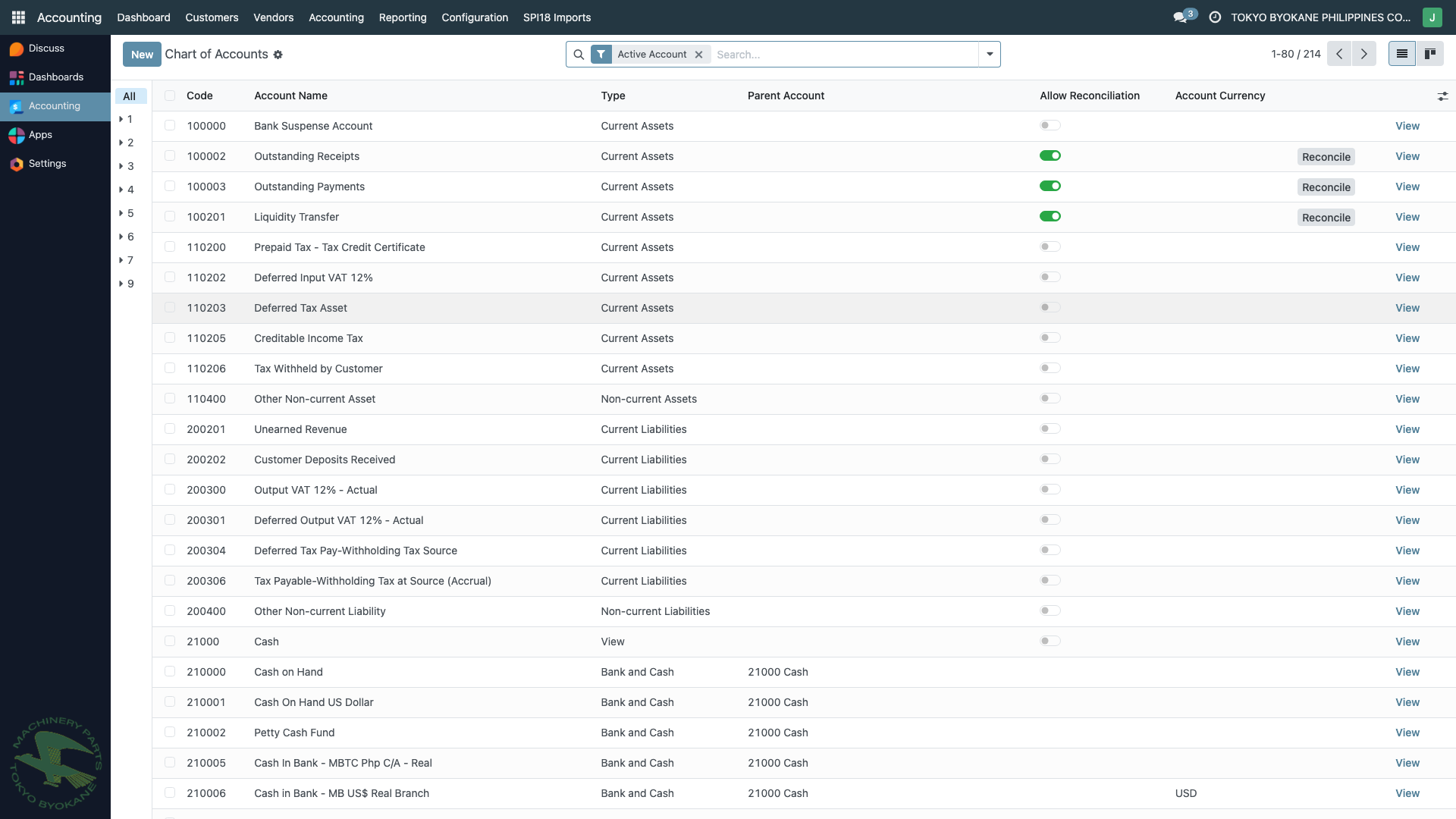
The list shows all accounts with:
- Code — the numeric account code (e.g.,
100000,221000) - Account Name — descriptive name
- Type — Current Assets, Non-current Assets, Current Liabilities, Bank and Cash, etc.
- Parent Account — for hierarchical grouping (via
account_parentmodule) - Allow Reconciliation — whether the account supports reconciliation (typically for receivable/payable accounts)
- Account Currency — if the account is restricted to a specific currency
Account Types
Every account has a type that determines how it behaves in reports and reconciliation:
| Type | Examples | Appears On |
|---|---|---|
| Bank and Cash | Cash on Hand, Bank accounts | Balance Sheet (Assets) |
| Current Assets | Accounts Receivable, Inventory, Prepaid Expenses | Balance Sheet (Assets) |
| Non-current Assets | Equipment, Vehicles, Intangibles | Balance Sheet (Assets) |
| Current Liabilities | Accounts Payable, Accrued Taxes, Short-term Loans | Balance Sheet (Liabilities) |
| Non-current Liabilities | Long-term Loans, Deferred Tax | Balance Sheet (Liabilities) |
| Equity | Capital, Retained Earnings | Balance Sheet (Equity) |
| Income | Sales Revenue, Other Income | Profit & Loss (Revenue) |
| Other Income | Forex Gain, Interest Income | Profit & Loss (Other) |
| Expenses | Utilities, Salaries, Supplies | Profit & Loss (Expenses) |
| Cost of Revenue | Cost of Goods Sold, Direct Labor | Profit & Loss (COGS) |
| Depreciation | Depreciation Expense | Profit & Loss (Expenses) |
| Off-Balance Sheet | Contingent liabilities, guarantees | Neither B/S nor P&L |
Account Code Structure
TBPC uses a structured numeric coding system:
| Range | Category |
|---|---|
| 100000-199999 | Assets (Current and Non-current) |
| 200000-299999 | Liabilities (Current and Non-current) |
| 300000-399999 | Equity |
| 400000-499999 | Revenue |
| 500000-599999 | Cost of Sales |
| 600000-699999 | Operating Expenses |
| 700000-799999 | Other Income / Other Expenses |
For example:
100000— Bank Suspense Account210006— Cash in Bank - MB US$ Real Branch221000— Accounts Receivable Trade500000— Sales/Revenues710100— Forex Gain
Hierarchical Parent Accounts
Thanks to the account_parent module, accounts can be organized into a hierarchy using Parent Accounts. This allows for consolidated reporting at group levels.
Example hierarchy:
210000 Cash on Hand (group/parent)
├── 210001 Cash On Hand US Dollar
└── 210002 Petty Cash Fund

210005 Cash In Bank (group/parent)
├── 210005 Cash In Bank - MBTC Php C/A - Real
├── 210006 Cash in Bank - MB US$ Real Branch
├── 210007 Cash in Bank - RCBC Peso (CIPII)
└── ...
To see the hierarchy, use the Chart of Accounts Hierarchy report (see Other Reports).
Creating a New Account
:::warning Superuser Operation Creating or modifying accounts affects all of TBPC's financial reporting. This should only be done by the Accounting Superuser after discussing with the controller. :::
- Navigate to Configuration > Accounting > Chart of Accounts
- Click New
- Enter:
- Code — the next available number in the appropriate range
- Account Name — descriptive name (should be clear for BIR audit review)
- Type — pick from the dropdown
- Default Taxes — if applicable
- Tags — for optional grouping
- Allow Reconciliation — check if this is a receivable/payable/tax account that will accumulate items to match
- Account Currency — leave blank unless the account should be restricted to one currency
- Parent Account — link to a grouping account if using the hierarchy
- Click Save
Modifying an Account
You can generally modify the name, type, or other fields on an existing account. However:
- Code changes should be avoided — they affect report filters and search
- Type changes should be considered carefully — moving an account from Assets to Expenses changes report placement
- Setting Allow Reconciliation = False on an account with reconciled items is blocked
Deprecating an Account
When an account is no longer needed but has historical entries (can't be deleted):
- Open the account form
- Check Deprecated
- Save
Deprecated accounts:
- Cannot be used on new transactions
- Still appear in historical reports
- Are hidden from default account selection dropdowns
ARE18 also validates on journal entry creation that you can't post to a deprecated account.
Best Practices
- Follow the numeric ranges — this keeps the chart organized and predictable
- Avoid duplicate accounts — before creating a new account, search the existing chart first
- Use parent accounts for grouping — this enables consolidated reports without restructuring individual accounts
- Mark reconciliation accounts clearly — Receivables, Payables, and Tax accounts should have
Allow Reconciliationchecked - Deprecate rather than delete — preserves audit trail
- Document new accounts — add a chatter note explaining why the account was created
Related Pages
- Chart of Accounts Hierarchy Report — visualize the parent-child structure
- Journals — link accounts to the journals that use them
- Taxes — configure tax accounts for VAT and withholding