Journals
Journals are the buckets that group related journal entries. Every posted transaction in ARE18 is assigned to a journal, which determines the default accounts, sequence numbers, and behavior of the entry.
Navigation
Configuration > Accounting > Journals
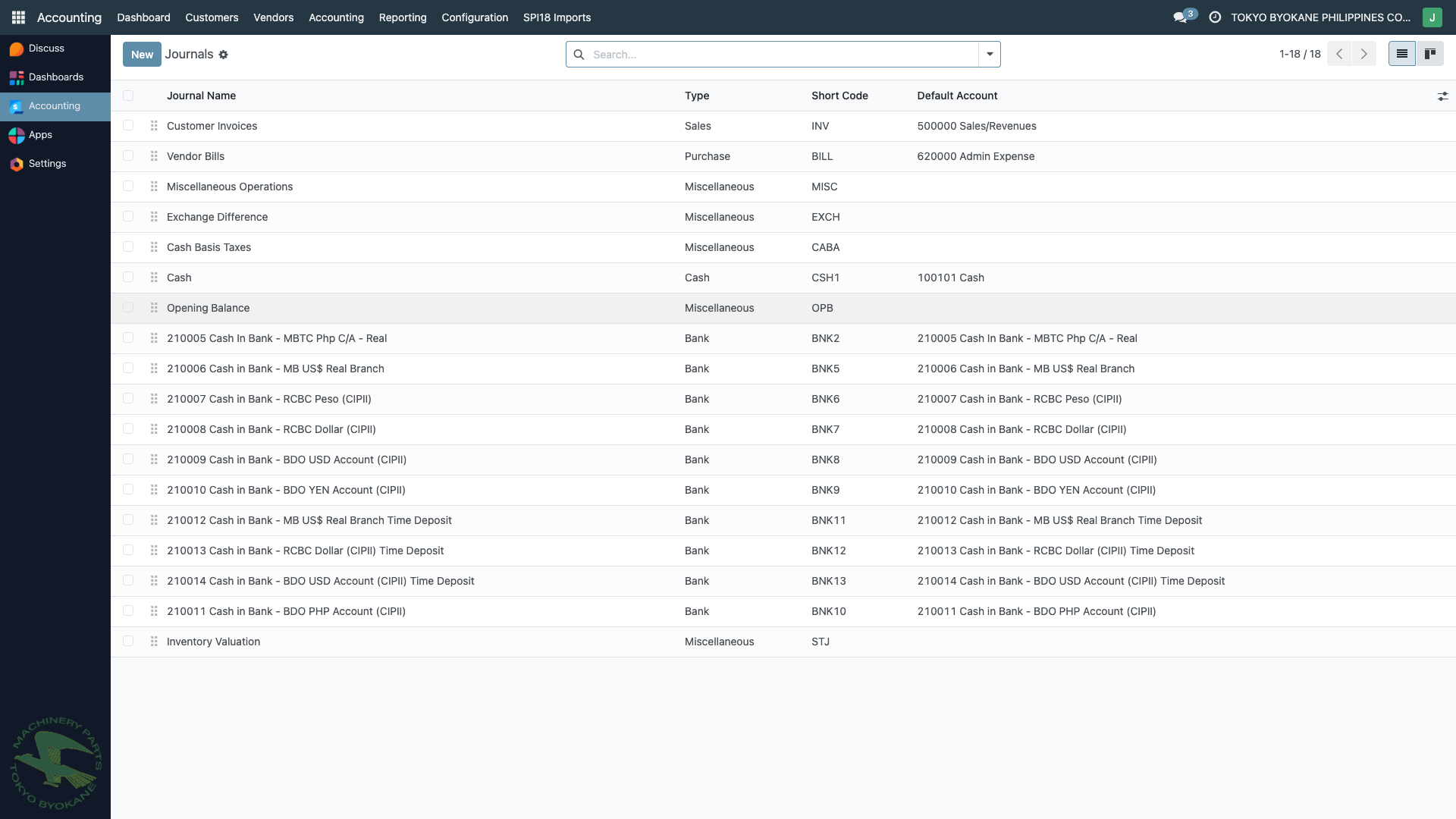
Journal Types
ARE18 uses the standard Odoo journal types:
| Type | Purpose | Example Journals at TBPC |
|---|---|---|
| Sales | Customer invoices and credit notes | Customer Invoices |
| Purchase | Vendor bills and refunds | Vendor Bills |
| Bank | Bank statements, transfers, check payments | MBTC-USD, Cash in Bank - RCBC Dollar, Cash In Bank - MB US$ Real Branch, etc. |
| Cash | Cash transactions, petty cash | Cash, Petty Cash Fund |
| General / Miscellaneous | Manual journal entries, accruals, adjustments, forex | Miscellaneous Operations, Exchange Difference, Cash Basis Taxes |
Why Journals Matter
Journals serve several important functions:
- Grouping — all sales invoices are in one journal, all bank payments in another, making reporting easier
- Default accounts — each journal has a default account for new entries (e.g., a bank journal defaults to the corresponding bank account)
- Sequence numbers — journal entries get auto-numbered based on the journal's short code (e.g.,
INV/2025/01491,BILL/2025/12/0009,MISC/2025/11/0030) - Access control — users can be restricted to certain journals via security groups
- BIR reporting — BIR books like the Sales Book and Purchase Book are filtered by journal type
Journal Form
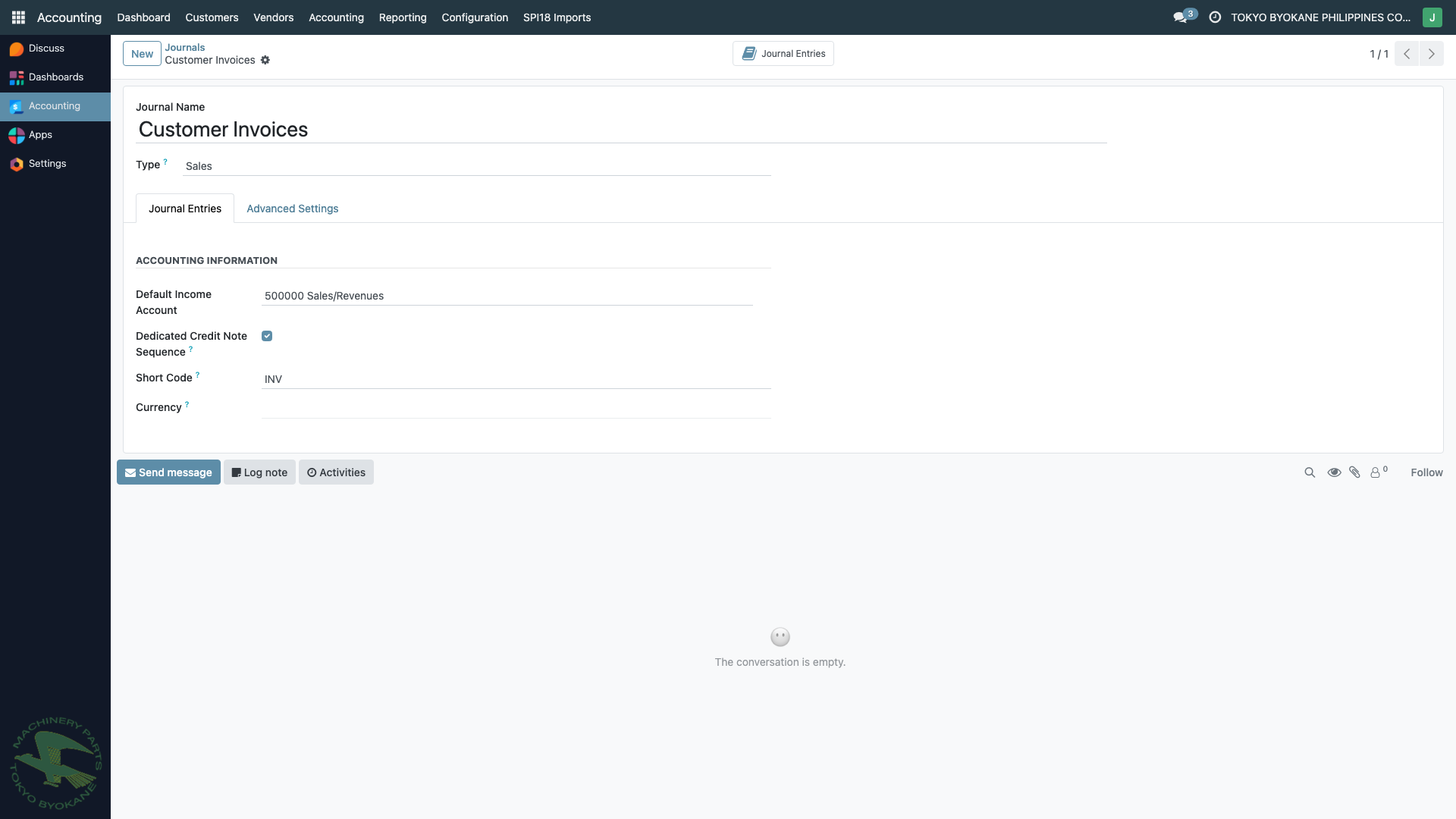
A journal has the following key fields:
General Information
| Field | Description |
|---|---|
| Journal Name | Display name (e.g., "Customer Invoices") |
| Type | Sales, Purchase, Bank, Cash, or General |
| Default Income/Expense Account | Account used when creating entries from this journal |
| Dedicated Credit Note Sequence | Whether credit notes get their own number series |
| Short Code | Prefix for auto-numbered entries (e.g., INV, BILL, MISC) |
| Currency | Restrict the journal to one currency (empty = company currency) |
Advanced Settings
- Sequence — the numbering pattern for entries in this journal
- Allowed Account Types — which account types are valid for lines in this journal
- Default Debit/Credit Account — for bank/cash journals
- Lock Posted Entries — advanced: whether posted entries can be reset to draft
- Control Access — which user groups can use the journal
TBPC Journal Setup
Sales Journal
Journal name: Customer Invoices (code INV)
- Default Income Account:
500000 Sales/Revenues - Used for: All customer invoices, credit notes, debit notes
- Sequence:
INV/YYYY/NNNNN
Purchase Journal
Journal name: Vendor Bills (code BILL)
- Default Expense Account: varies by line item
- Used for: All vendor bills, bill refunds
- Sequence:
BILL/YYYY/MM/NNNN
Bank Journals
TBPC has one bank journal per physical bank account:
| Code | Account | Default Cash Account |
|---|---|---|
| BNK1 | MBTC-USD 3782378002189 | 210006 Cash in Bank - MB US$ Real Branch |
| BNK2 | 210005 Cash In Bank - MBTC Php C/A - Real | 210005 |
| BNK5 | 210006 Cash in Bank - MB US$ Real Branch | 210006 |
| BNK7 | 210008 Cash in Bank - RCBC Dollar (CIPII) | 210008 |
| BNK8 | 210009 Cash in Bank - BDO USD Account (CIPII) | 210009 |
| ... | ... | ... |
:::warning Default Account Matters Each bank journal's default debit/credit account must match the corresponding Chart of Accounts entry. A misconfigured default account will cause payments to post to the wrong GL account — this actually happened with BNK5 in late 2025 and required a 541-row correction. Always double-check the default account after creating or editing a bank journal. :::
Cash Journals
| Code | Description |
|---|---|
| CSH1 | Cash (general petty cash) |
General Journals
| Code | Purpose |
|---|---|
| MISC | Manual journal entries, adjustments, accruals |
| EXCH | Exchange Difference (auto-created by Odoo for forex gain/loss) |
| CABA | Cash Basis Taxes (auto-created for cash-basis VAT entries) |
Creating a New Journal
:::warning Superuser Operation Creating journals affects BIR reporting and user workflows. Only the Accounting Superuser should create new journals, and only after discussing with the controller. :::
- Navigate to Configuration > Journals
- Click New
- Fill in:
- Journal Name — clear, descriptive name
- Type — Sales, Purchase, Bank, Cash, or General
- Short Code — 3-5 character prefix for entry numbers
- Default Account — the GL account this journal primarily affects
- Currency — only if restricting to one currency
- In Advanced Settings, configure:
- Allowed account types
- Sequence options
- Access control
- Click Save
Archiving a Journal
Journals with posted entries cannot be deleted. To hide an unused journal:
- Open the journal form
- Click the gear icon or Actions menu
- Click Archive
Archived journals are hidden from new transaction dropdowns but preserved in history.
Best Practices
- One journal per bank account — each physical bank account should have its own journal
- Verify default accounts — a wrong default account causes mispostings (see warning above about BNK5)
- Use descriptive names — include the bank name, currency, and account type
- Don't reuse journals across currencies — if a bank account is multi-currency, consider whether one journal or multiple is cleaner
- Keep codes short — 3-5 characters (INV, BILL, BNK5, MISC)
- Document in chatter — when you create or edit a journal, note why
Related Pages
- Chart of Accounts — the accounts journals post to
- Taxes — tax configuration linked to journals
- BIR Books of Accounts — reports filtered by journal type