Taxes
Taxes in ARE18 control how VAT (Value Added Tax) and Expanded Withholding Tax (EWT) are computed on customer invoices and vendor bills. Proper tax configuration is critical for BIR compliance — taxes drive the Sales Book, Purchase Book, SLSP, and BIR 2307 reports.
Navigation
Configuration > Accounting > Taxes
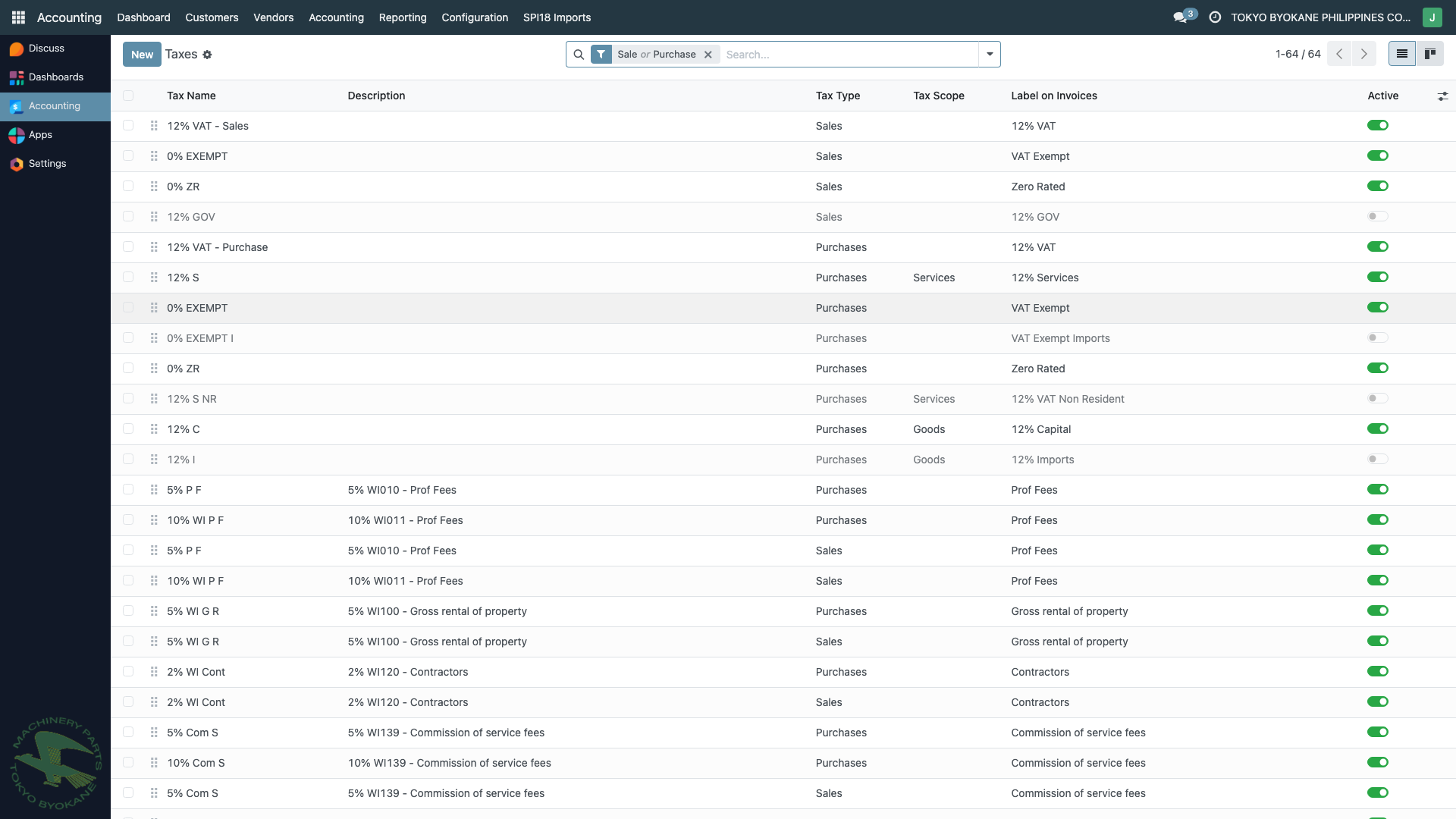
Tax Types at TBPC
TBPC uses several categories of taxes:
| Category | Scope | Example |
|---|---|---|
| VAT Output | Customer invoices (sales) | 12% VAT - Sales, 12% GOV |
| VAT Input | Vendor bills (local purchases) | 12% VAT - Purchase, 12% S, 12% S NR |
| VAT Zero-Rated | PEZA-registered sales | 0% Zero-Rated |
| VAT Exempt | Exempt transactions | 0% Exempt |
| Expanded Withholding Tax | Vendor payments subject to EWT | EWT Sup 2%, EWT Prof 10%, EWT Contractor 2%, etc. |
| Final Withholding Tax | Special withholding scenarios | FWT (for specific ATCs) |
Why Taxes Matter
Taxes are not just calculations — they drive several downstream effects:
- Invoice/bill amounts — automatically compute VAT and withholding per line
- Journal entries — post to the correct VAT Input / Output accounts
- BIR reporting — feed the Sales Book, Purchase Book, SLSP, and VAT reports
- Withholding tax certificates — drive the ATC codes and amounts on BIR Form 2307
- Tax grids — classify transactions for the BIR Alpha List reports
Getting the tax configuration right means the books and BIR reports match without manual adjustment.
Tax Form
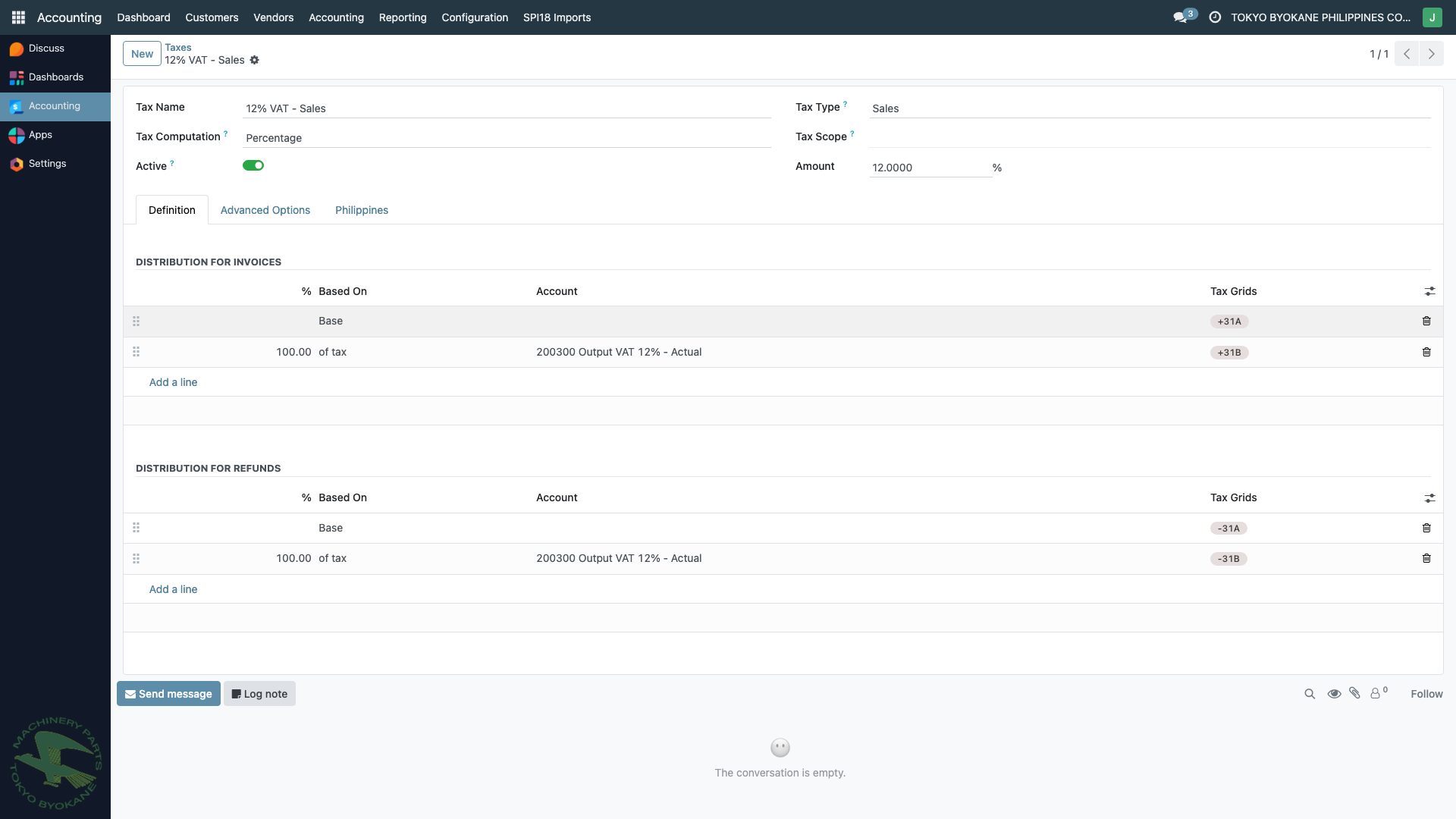
A tax record has several key sections:
Basic Information
| Field | Description |
|---|---|
| Tax Name | Display name (e.g., "12% VAT - Sales") |
| Tax Type | Sales (for customer invoices), Purchase (for vendor bills), or None (disabled) |
| Tax Scope | Services, Goods, or blank (both) |
| Tax Computation | Percentage, Fixed, Division of, etc. — usually Percentage |
| Amount | The tax rate (e.g., 12.0000 for 12%) |
| Active | Whether the tax appears in dropdowns |
Definition Tab
The Distribution for Invoices and Distribution for Refunds subsections define how the tax amount is split across accounts and tax grids.
For VAT Output (12% VAT - Sales)
Distribution for Invoices:
- 100% of tax → Account
200300 Output VAT 12% - Actual - Tax Grids:
+DT(added to the VAT Output reporting grid)
Distribution for Refunds:
- 100% of tax → Account
200300 Output VAT 12% - Actual(reversed) - Tax Grids:
-DT
For VAT Input (12% VAT - Purchase)
Distribution for Invoices:
- 100% of tax → Account
160100 Input VAT 12% - Actual - Tax Grids:
+IT
Distribution for Refunds: reversed
For Withholding Tax (e.g., EWT Sup 2%)
Withholding taxes are represented as negative percentages:
- Amount:
-2.0000(negative 2%) - Tax Computation: Percentage of untaxed base
- Distribution: Posts to
218110 Expanded Withholding Tax - 2%(liability account) - Tax Grids: feeds the BIR 2307 report and the MAP/QAP alphalists
The negative amount causes the withholding to reduce the amount payable to the vendor while creating a liability to BIR.
Advanced Options Tab
| Field | Description |
|---|---|
| Label on Invoices | How the tax appears on printed invoices (e.g., "VAT 12%") |
| Tax Group | For grouping on tax totals (e.g., "VAT", "Withholding") |
| Include in Price | If checked, the unit price already includes the tax |
| Affect Base of Subsequent Taxes | For cascading taxes (rare) |
| Base Affected By Previous Taxes | For sequential tax computation |
| Country | Philippines (for l10n_ph compliance) |
Philippines Tab
This tab contains Philippine-specific fields from the l10n_ph module:
- ATC Code — the BIR Alphanumeric Tax Code (e.g.,
WC158for professional services) - BIR Nature of Income — category label for reports
These fields are critical for BIR 2307 generation and the MAP/QAP alphalist reports. A withholding tax without an ATC code will not appear correctly on BIR submissions.
Common Tax Configurations at TBPC
VAT Output Taxes
| Name | Amount | Account | Used For |
|---|---|---|---|
| 12% VAT - Sales | 12% | 200300 Output VAT 12% | Standard local sales |
| 12% GOV | 12% | (gov-specific) | Government sales |
| 0% Zero-Rated | 0% | — | PEZA-registered sales |
| 0% Exempt | 0% | — | Exempt transactions |
VAT Input Taxes
| Name | Amount | Account | Used For |
|---|---|---|---|
| 12% VAT - Purchase | 12% | 160100 Input VAT 12% | Standard local purchases |
| 12% S | 12% | 160100 Input VAT 12% | Standard with specific treatment |
| 12% S NR | 12% | 160100 Input VAT 12% | Non-resident supplier |
Withholding Taxes
| Name | Amount | ATC | Used For |
|---|---|---|---|
| EWT Sup 2% | -2% | WC158 | Top withholding agents - suppliers |
| EWT Contractor 2% | -2% | WC100 | Contractors |
| EWT Prof 10% | -10% | WC010 | Professional fees |
| EWT Rent 5% | -5% | WC060 | Rental payments |
(The above are examples — refer to your actual tax list for the exact names and ATCs.)
Using Taxes on Invoices and Bills
When you add a line to a customer invoice or vendor bill:
- Select the Product or enter a free-form description
- In the Taxes column, select the applicable tax(es)
- Odoo automatically computes:
- The tax amount per line
- The tax totals at the bottom of the invoice
- The journal entries posting to VAT Output/Input accounts
Multiple Taxes Per Line
A line can have multiple taxes at once, for example:
- Vendor bill for professional services:
12% VAT - Purchase+EWT Prof 10% - Result: Net amount, 12% VAT added, 10% withholding subtracted from payment
The line total shown on the bill is the net payable to the vendor after withholding.
Creating or Modifying Taxes
:::warning Superuser Operation Tax configuration directly affects BIR reporting. Never modify taxes without:
- Understanding the impact on historical reports (BIR may flag discrepancies)
- Consulting with the controller or BIR advisor
- Documenting the change in the tax record's chatter
- Testing on a staging database first :::
Creating a New Tax
- Navigate to Configuration > Taxes
- Click New
- Fill in:
- Tax Name
- Tax Type (Sales or Purchase)
- Amount
- Definition: account(s) and tax grid(s)
- Philippines: ATC code if applicable
- Click Save
Modifying an Existing Tax
Changes take effect for new transactions. Existing posted entries are not retroactively updated — they keep the original tax calculation. This is important for BIR audit integrity.
Best Practices
- Don't delete taxes — archive them instead to preserve historical references
- Use descriptive names — include the rate, type, and purpose (e.g., "EWT Prof 10% - WC010")
- Always set ATC codes — critical for BIR 2307 and alphalist reports
- Verify tax grids — wrong grids cause wrong amounts on BIR reports
- Group similar taxes — use Tax Groups for clean invoice tax summaries
- Don't mix VAT and withholding logic — keep them as separate taxes on the same line
- Test before going live — create a draft invoice/bill and verify the computation before saving new tax records
Related Pages
- Chart of Accounts — the accounts taxes post to
- BIR 2307 — how withholding tax flows to the certificate
- BIR Tax Reports — SLSP, VAT, SAWT, Expanded reports
- Recording a Vendor Bill — applying taxes on bills
- Recording an Invoice — applying taxes on invoices