Realized Forex Gain/Loss on Customer Collections
When you collect a customer payment for an invoice that was issued in a foreign currency, realized forex gain or loss may arise due to exchange rate movement between the invoice date and the payment date.
Odoo automatically computes and posts the difference to the company's Forex Gain or Forex Loss account.
When Does Realized Forex Occur?
Realized forex arises in these scenarios:
Scenario A: Invoice in USD, Paid via PHP Bank
- Invoice: $10,000 USD dated 01/01/2026 (rate: 1 USD = 59.00 PHP)
- Customer pays ₱590,000 into a PHP bank on 03/01/2026 (rate: 1 USD = 58.50 PHP)
- The ₱590,000 now converts to $10,085.47 USD — a gain of $85.47
Scenario B: Invoice in USD, Paid via USD Bank (at different date)
- Invoice: $10,000 USD dated 01/01/2026 (rate: 59.00 PHP)
- Payment: $10,000 USD on 03/01/2026 (rate: 58.50 PHP)
- No forex G/L — both amounts are in the same currency as the invoice
Scenario C: Invoice in PHP, Paid via USD Bank
- Invoice: ₱50,000 PHP dated 01/01/2026 (rate: 59.00 PHP/USD)
- Customer wire-transfers $860 USD to the USD bank
- Odoo converts the $860 at today's rate and reconciles — difference posted to forex G/L
How Odoo Computes the Gain/Loss
The calculation is:
Forex G/L = (Amount received in company currency at payment rate)
          - (Original amount in company currency at invoice rate)
If the result is positive → Forex Gain (credit Forex Gain account)
If the result is negative → Forex Loss (debit Forex Loss account)
The Automatic Journal Entry
When you reconcile a multi-currency invoice with a payment, Odoo creates an Exchange Difference journal entry like this:
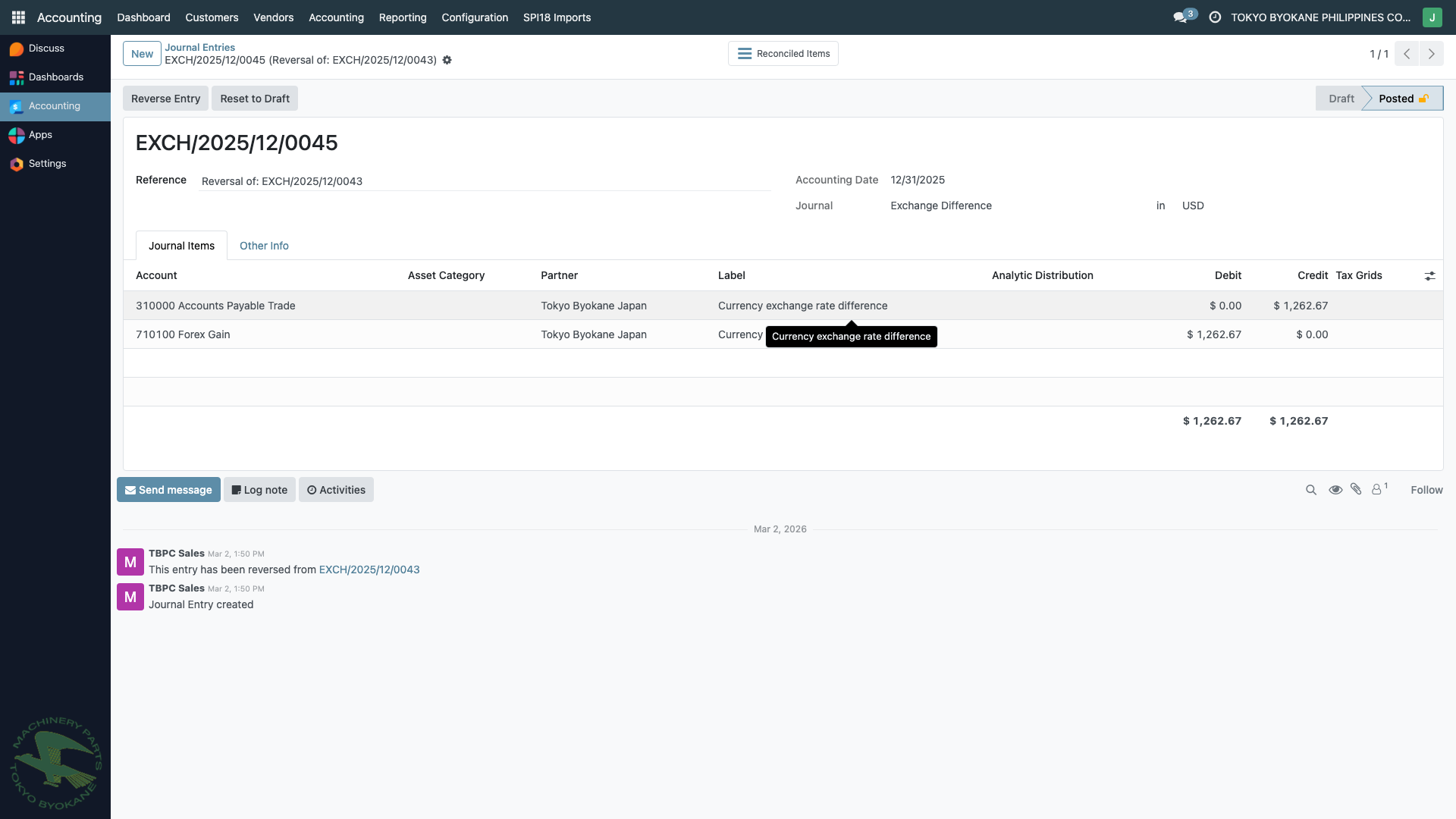
This example shows EXCH/2025/12/0045 — a $1,262.67 exchange rate difference:
- Reference: Reversal of EXCH/2025/12/0044 (typical pattern — Odoo creates offsetting entries)
- Journal: Exchange Difference
- Lines:
- Account 210000 Accounts Payable Trade — debit $1,262.67
- Account 710100 Forex Gain — credit $1,262.67
The entry is automatically posted and reconciled with the original invoice/payment pair.
Step-by-Step Example
Scenario: TBPC issues INV/2026/00100 to a customer for $10,000 USD on 01/15/2026 when the PHP rate is 59.50. The customer sends a check that clears on 02/28/2026 when the rate is 58.00.
Step 1: Invoice Posting (01/15/2026)
DR  Accounts Receivable         $10,000
CR  Sales/Revenue               $10,000
Stored in USD (no forex yet).
Step 2: Customer Payment (02/28/2026)
The customer sends ₱580,000 (they converted $10,000 × 58.00 themselves and paid in PHP).
Collection recorded in PHP bank journal:
DR  PHP Bank                    ₱580,000  (= $10,000 at 58.00)
CR  Accounts Receivable         $10,000   (at the invoice rate)
Step 3: Reconciliation and Auto-Forex
When you reconcile the invoice with the collection, Odoo recognizes the rate difference:
- Original A/R debit: $10,000 (at 59.50 rate = ₱595,000 equivalent)
- Actual bank credit: $10,000 (at 58.00 rate = ₱580,000 equivalent)
- Difference: ₱15,000 less received in PHP terms
Since TBPC reports in USD, this is actually a gain for TBPC's USD books (the customer effectively paid in appreciating pesos... actually it depends on direction — let's say this scenario yields a loss because fewer USD-equivalent were received).
Odoo automatically posts:
DR  Forex Loss (710101)         $XXX
CR  Accounts Receivable         $XXX
(Or reversed if it's a gain.)
The exact direction depends on which currency moved which way — but Odoo handles this correctly without manual intervention.
Where to Find Exchange Difference Entries
- From an invoice: Open a paid multi-currency invoice → check the Journal Items tab → look for linked
EXCH/...entries - From the Journal: Accounting > Journal Entries → filter by Exchange Difference journal
- From the G/L accounts: Run the General Ledger report on accounts
710100 Forex Gainand710101 Forex Loss
Verification Checklist
After reconciling a multi-currency collection:
- The invoice is marked Paid
- The payment is marked Reconciled
- An
EXCH/...entry exists in the Exchange Difference journal (if rates differed) - The total debits equal total credits for that customer's A/R sub-ledger
:::tip Multi-Currency Aged Receivables The Aged Receivables report shows balances in the company currency (USD), so unrealized forex on open invoices is reflected in each period's snapshot. Once paid and reconciled, forex becomes realized via the Exchange Difference entry. :::
:::note Customer paid less than the invoice amount? That is a different scenario from automatic exchange difference. See Short Payment with Forex Write-off for the "Mark as fully paid" workflow that writes the shortfall off to Forex Loss. :::
Related Pages
- Multi-Currency Overview — currency setup and concepts
- Forex on Disbursements — the same mechanism for vendor payments
- Short Payment with Forex Write-off — for short-paid invoices
- Receiving a Customer Payment — the collection workflow