Realized Forex Gain/Loss on Vendor Disbursements
When you pay a vendor bill in a currency different from the company currency (or on a different date than the bill), realized forex gain or loss may arise from exchange rate movements.
Odoo automatically computes and posts the difference to the Forex Gain or Forex Loss account — exactly the same mechanism as with customer collections.
When Does Realized Forex Occur?
Scenario A: PHP Bill, Paid Later at a Different Rate
- Bill: ₱83,292.46 PHP dated 12/01/2025 (rate: 1 USD = 58.80 PHP → $1,416.54 USD)
- Payment via PHP bank on 12/12/2025 (rate: 59.10 PHP → $1,409.42 USD)
- Difference: $7.12 — TBPC paid slightly less in USD terms → Forex Gain
Scenario B: USD Bill, Paid via PHP Bank
- Bill: $5,000 USD dated 01/15/2026
- Payment: PHP bank transfers equivalent of $5,000 at today's PHP rate
- The conversion difference creates forex G/L
Scenario C: USD Bill, Paid via USD Bank on Different Date
- Bill: $5,000 USD dated 01/15/2026 (internal reference rate: 59.00 PHP)
- Payment: $5,000 USD via USD bank on 02/15/2026 (reference rate: 58.00 PHP)
- In USD books: no forex — the bill and payment are both $5,000
- But the PHP equivalent for local reporting changes — handled automatically by Odoo for PHP reports
How Odoo Computes the Gain/Loss
Same formula as collections:
Forex G/L = (Amount paid in company currency at payment rate)
          - (Original amount in company currency at bill rate)
If the result is negative (TBPC paid less than the booked expense) → Forex Gain
If the result is positive (TBPC paid more than the booked expense) → Forex Loss
The Automatic Journal Entry
When you reconcile a multi-currency bill with a payment, Odoo creates an Exchange Difference entry:
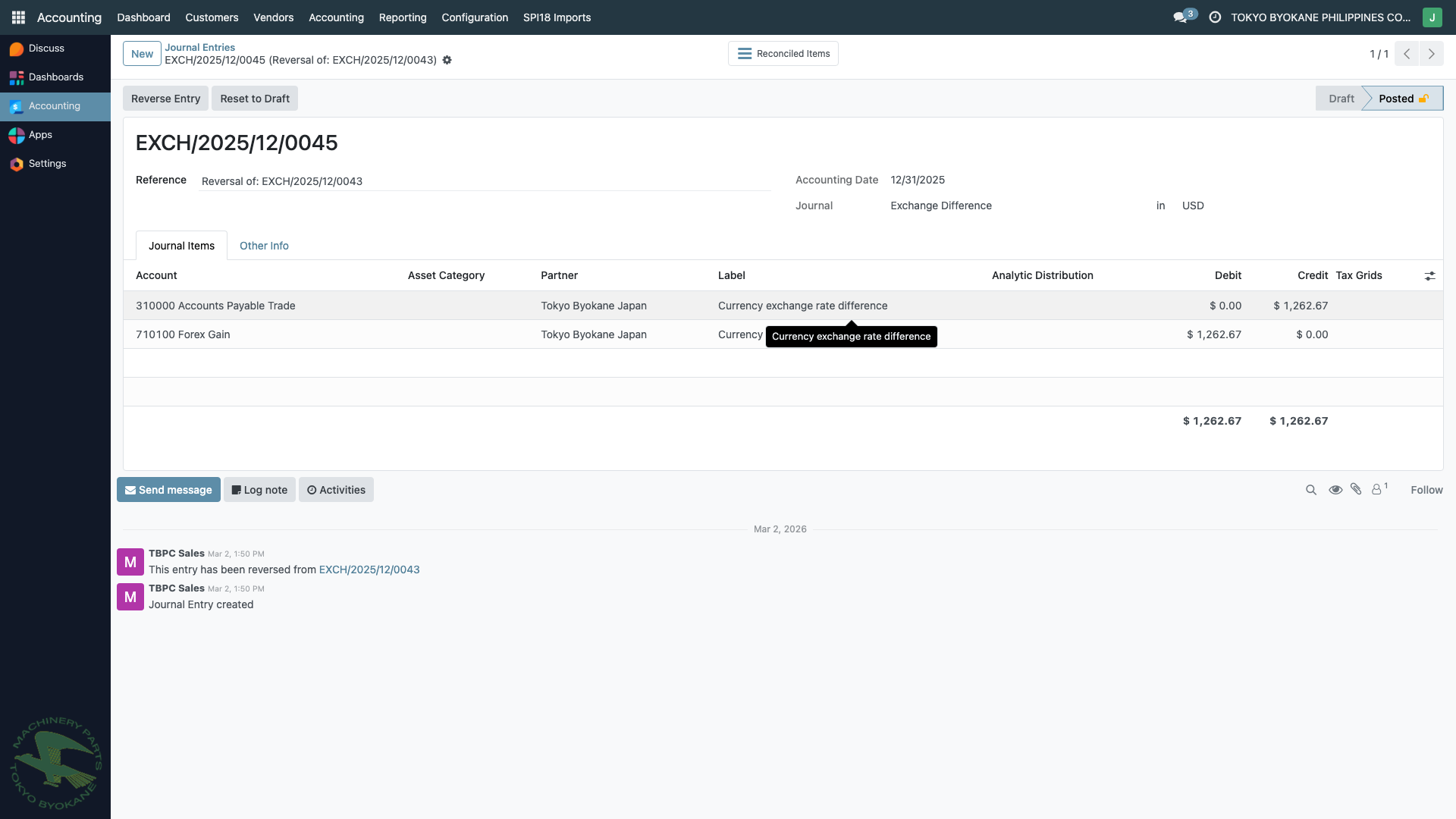
The journal entry pattern for a disbursement forex gain:
DR  Accounts Payable Trade      $X.XX
CR  Forex Gain (710100)         $X.XX
Or for a forex loss:
DR  Forex Loss (710101)         $X.XX
CR  Accounts Payable Trade      $X.XX
Step-by-Step Example
Scenario: TBPC receives a PHP utility bill for ₱100,000 dated 01/15/2026 when the rate is 59.50 PHP/USD ($1,680.67). The bill is paid on 02/28/2026 when the rate is 58.00 PHP/USD.
Step 1: Bill Posting (01/15/2026)
DR  Utilities Expense           $1,680.67  (at 59.50 rate = ₱100,000)
CR  Accounts Payable            $1,680.67
Stored in PHP as the primary currency, USD as the converted amount.
Step 2: Payment (02/28/2026)
Payment issued from PHP bank for ₱100,000. At 58.00 rate, this equals $1,724.14 in USD.
DR  Accounts Payable            $1,724.14
CR  PHP Bank                    ₱100,000 (= $1,724.14)
But the original A/P was only $1,680.67 — there's a $43.47 difference.
Step 3: Reconciliation and Auto-Forex
Odoo recognizes the rate gap and automatically posts:
DR  Forex Loss (710101)         $43.47
CR  Accounts Payable            $43.47
This clears the residual, and the bill is fully Paid with the forex loss properly recognized.
Where to Find Exchange Difference Entries
- From a bill: Open a paid multi-currency bill → check the Journal Items tab → look for linked
EXCH/...entries - From the Journal: Accounting > Journal Entries → filter by Exchange Difference journal
- From the G/L accounts: General Ledger report on
710100 Forex Gainand710101 Forex Loss
Common Patterns at TBPC
| Bill Currency | Bank Currency | Typical Result |
|---|---|---|
| PHP | PHP | Small forex G/L (rate drift between bill and payment date) |
| USD | USD | No forex (same currency on both sides) |
| PHP | USD | Always generates forex G/L (dual conversion) |
| USD | PHP | Always generates forex G/L (dual conversion) |
| JPY | PHP or USD | Always generates forex G/L (JPY involved) |
Verification Checklist
After reconciling a multi-currency disbursement:
- The bill is marked Paid
- The payment is marked Reconciled
- An
EXCH/...entry exists in the Exchange Difference journal (if rates differed) - The Accounts Payable balance for the vendor is correctly zero (or reduced)
Troubleshooting
"The bill shows Partially Paid even though the full amount was sent"
This usually means the exchange rate at payment date differs from the bill date, and Odoo is waiting for you to reconcile. Steps:
- Open the bill's Journal Items tab
- Find the unreconciled residual line
- Reconcile it — Odoo will auto-create the Exchange Difference entry
"Forex entries look reversed"
The Exchange Difference journal sometimes creates pairs of entries (one and its reversal) to handle partial reconciliation. This is normal Odoo behavior — focus on the net effect on the Forex Gain/Loss accounts.
Related Pages
- Multi-Currency Overview — currency setup and concepts
- Forex on Collections — the same mechanism for customer payments
- Paying a Vendor Bill — the disbursement workflow