Closing of Accounts in Odoo 18
This page explains how year-end closing works in Odoo 18 (ARE18) and why we do not need an automated retained-earnings cron job like the one in our legacy PowerApps system.
TL;DR
- Odoo already handles year-end closing — just differently from PowerApps.
- It does not post a closing journal entry. Instead, the Balance Sheet automatically shows the current year's P&L under a holding equity account (Undistributed Profits/Losses), and rolls it into Retained Earnings the moment a new fiscal year starts.
- The Fiscal Year Lock Date (also called Global Lock Date in the wizard) is what formally "closes" the books — not a journal entry.
- Recommendation: Do not build an automated closing-entry cron. Use the Lock Date. If BIR or external auditors specifically require a posted closing JE in the GL, we can revisit.
Background
The accounting team received a proposal describing an "Automated Retained Earnings Entry" feature for Odoo:
A scheduled action (cron) that triggers on the fiscal year closing date, calculates net profit/loss, generates a retained earnings journal entry, and re-posts it whenever late entries change last year's numbers — until the accounting date is locked.
This is how the legacy PowerApps system handles year-end closing: it posts an actual journal entry on Dec 31 transferring net income into Retained Earnings. P&L accounts are explicitly zeroed out as a GL transaction.
The question: should Odoo work the same way?
Short answer: no, because Odoo already gives you the same end result through a different mechanism that is safer, audit-friendlier, and requires no automation to maintain.
How Odoo Handles Closing (vs. PowerApps)
| Aspect | PowerApps (legacy) | Odoo 18 (current) |
|---|---|---|
| Closing journal entry posted? | Yes, on Dec 31 | No — never posted |
| Where does net P&L live? | Moved to Retained Earnings via JE | Computed on-the-fly under "Current Year Earnings" |
| Late entries to prior year | Unpost + recompute + repost closing JE | Balance Sheet just re-computes automatically |
| Formal "books closed" mechanism | The closing JE | Fiscal Year Lock Date |
| Risk if automation fails | Corrupted closing entry / mismatched RE | None — no automation to fail |
| Maintenance burden | Cron + JE generator logic | None |
Odoo's mechanism in detail
Every Odoo company is configured with an unaffected_earnings_account (account type equity_unaffected). In the TBPC chart of accounts this is:
| Code | Name | Type |
|---|---|---|
| 430000 | Retained Earnings | Equity |
| 999999 | Undistributed Profits/Losses | Current Year Earnings |
When the Balance Sheet runs:
- For dates within the current fiscal year: the YTD net P&L (Income − Expenses) is summed and displayed on the Undistributed Profits/Losses line.
- For dates after the fiscal year ends: the prior year's net P&L is automatically rolled into the Retained Earnings total. Undistributed Profits/Losses now shows only the new fiscal year's YTD P&L.
No journal entry is posted at any point. The roll-over is purely a report-time computation based on the date you ask for.
Why This Approach Is Better
- No risk of corrupted closing entries. PowerApps' approach has to unpost and repost a closing JE every time a late entry hits the prior year. Each cycle is a place where the system can fail — leaving a half-closed period with wrong Retained Earnings until someone notices.
- Audit-friendly. Auditors can see raw P&L accounts unchanged. With a closing JE, P&L accounts get a giant offsetting entry on Dec 31 that obscures the actual flow.
- Less to maintain. No cron to monitor, no closing journal to manage, no edge cases to debug when the cron didn't fire or fired twice.
- The Lock Date is the real "closing." Once the Fiscal Year Lock Date is set to Dec 31, no one can post backdated entries to the closed period anyway. That's what formally closes the books — a closing JE on top of it is decorative.
Demo: See It For Yourself
The screenshots below are from the actual ARE18 database. You can reproduce these in five minutes.
Step 1: Confirm the "Current Year Earnings" account exists
Go to Accounting → Configuration → Chart of Accounts. Search for Retained Earnings and add Undistributed as a second search term.
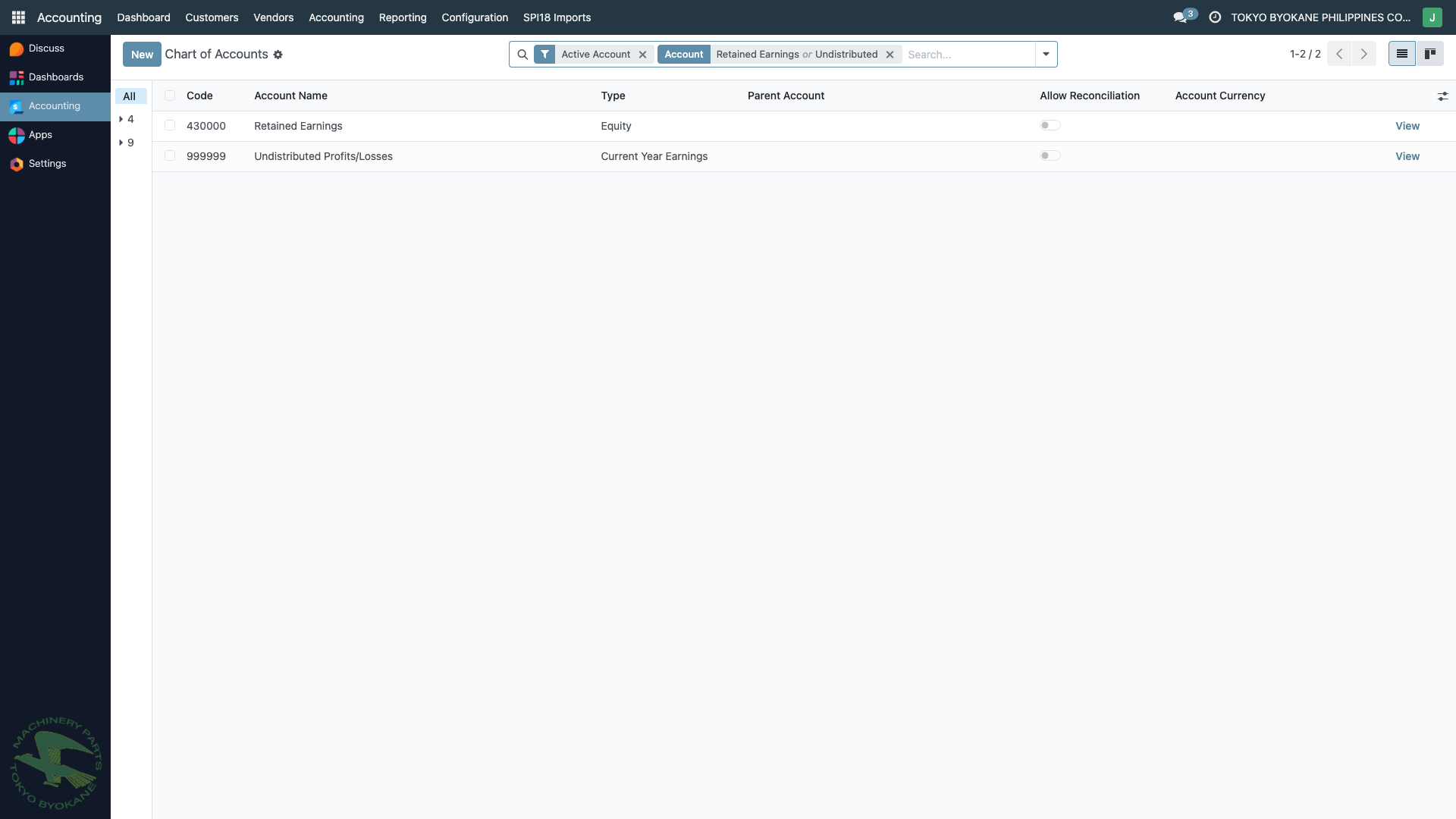
You should see two accounts:
- 430000 — Retained Earnings (type: Equity) — accumulated profits from prior years
- 999999 — Undistributed Profits/Losses (type: Current Year Earnings) — Odoo's holding account for the current FY's net income
The second account is the one Odoo uses for its on-the-fly rollover.
Step 2: View the Balance Sheet at end of FY 2025
Open Accounting → Reporting → Balance Sheet. Set the date inputs to Dec 2025 and click Generate.
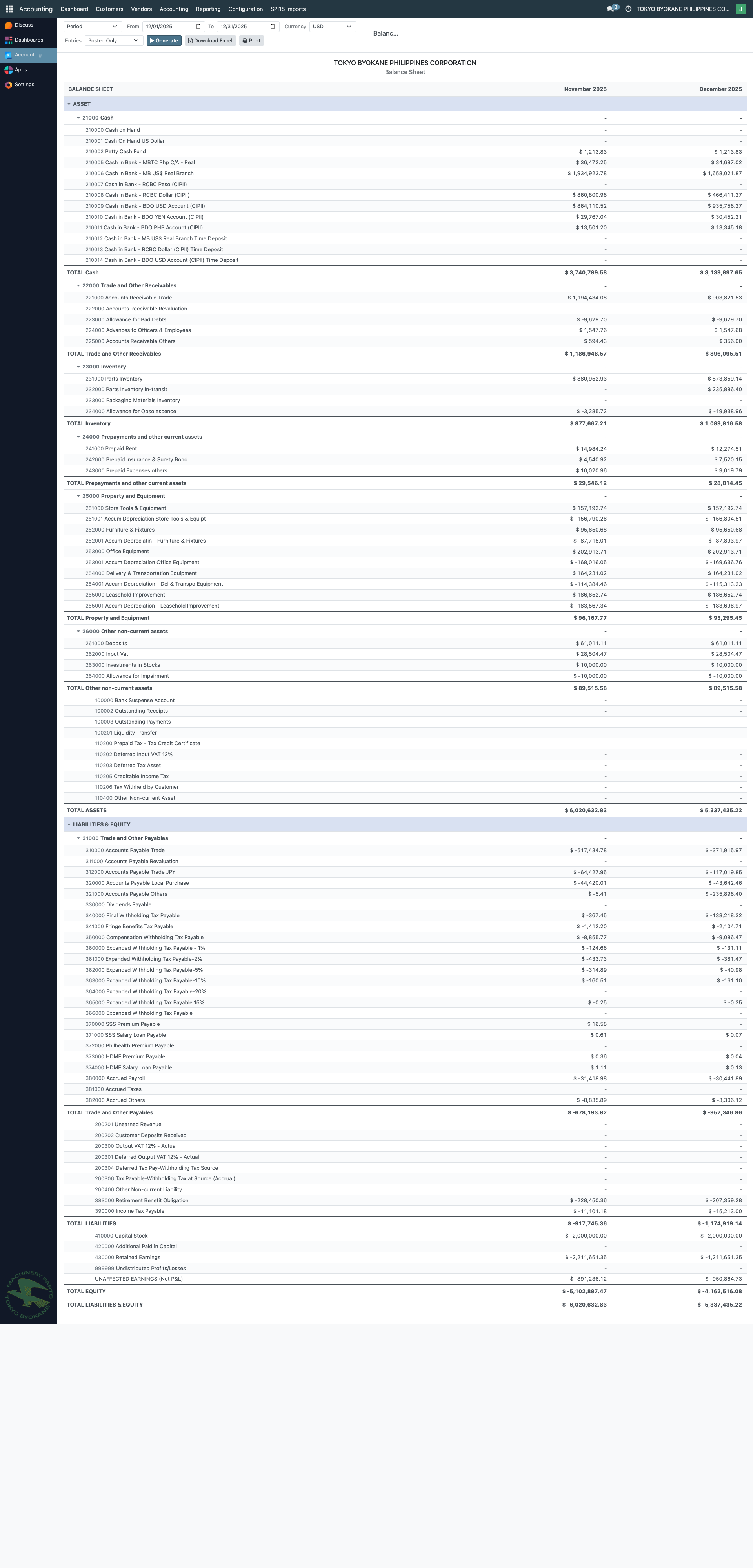
Scroll to the EQUITY section at the bottom. You will see:
- Retained Earnings — the balance from prior years (no 2025 P&L yet)
- Undistributed Profits/Losses — the 2025 YTD net income, displayed here automatically
No journal entry has been posted to produce this figure. Odoo computed it by summing income and expense accounts for the period.
Step 3: Simulate the "after year-end" view
In the same report, change the date to January 2026 and click Generate. The report now shows December 2025 and January 2026 columns side-by-side.
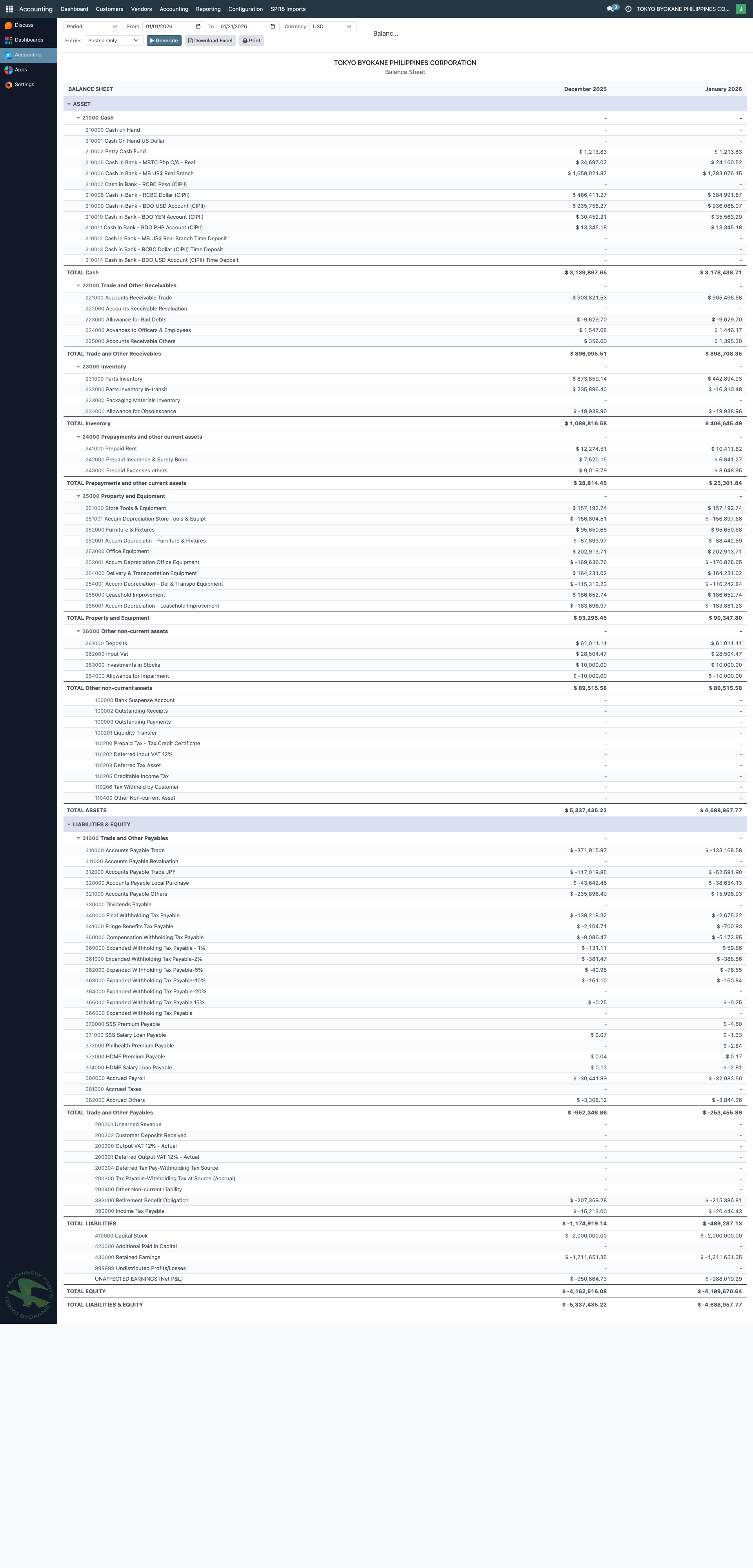
Look at the Equity section in both columns:
- December 2025 column: Retained Earnings = X. Undistributed Profits/Losses = Y (the 2025 net income).
- January 2026 column: Retained Earnings = X + Y (now includes the 2025 net income). Undistributed Profits/Losses has reset, showing only January 2026 partial P&L.
Critically: no journal entry was posted between December 31 and January 1. The roll-over happened entirely at report-render time. Both views of the Balance Sheet are correct.
Step 4: The Lock Date is the "real" closing
Open the Lock Dates wizard (see the Lock Dates page for full details).
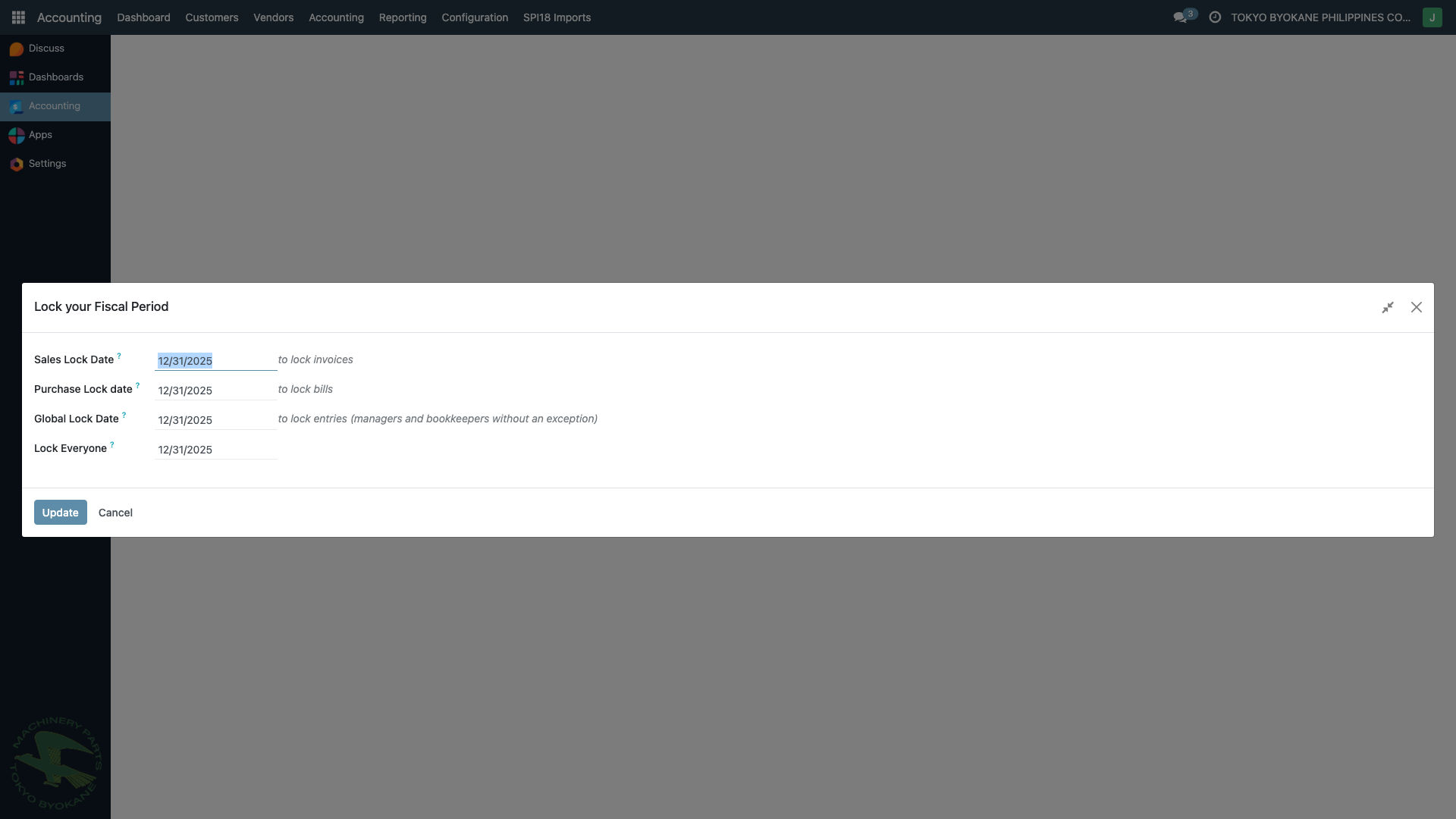
The wizard shows four lock-date fields. The Global Lock Date is the fiscal-year lock — it prevents managers and bookkeepers (without exception) from posting in the locked period.
Setting the Global Lock Date to December 31, 2025 is the formal "books closed" action. After that date, the prior year's numbers cannot change, and the Balance Sheet's Retained Earnings figure becomes immutable.
The field labelled Global Lock Date in the wizard is the same as Odoo's standard fiscalyear_lock_date field — the labels are inherited from base Odoo. Despite the name "Global", it specifically locks the fiscal year for managers and bookkeepers.
Step 5: Confirm no closing entries exist
Go to Accounting → Accounting → Journal Items. Search for the word closing.
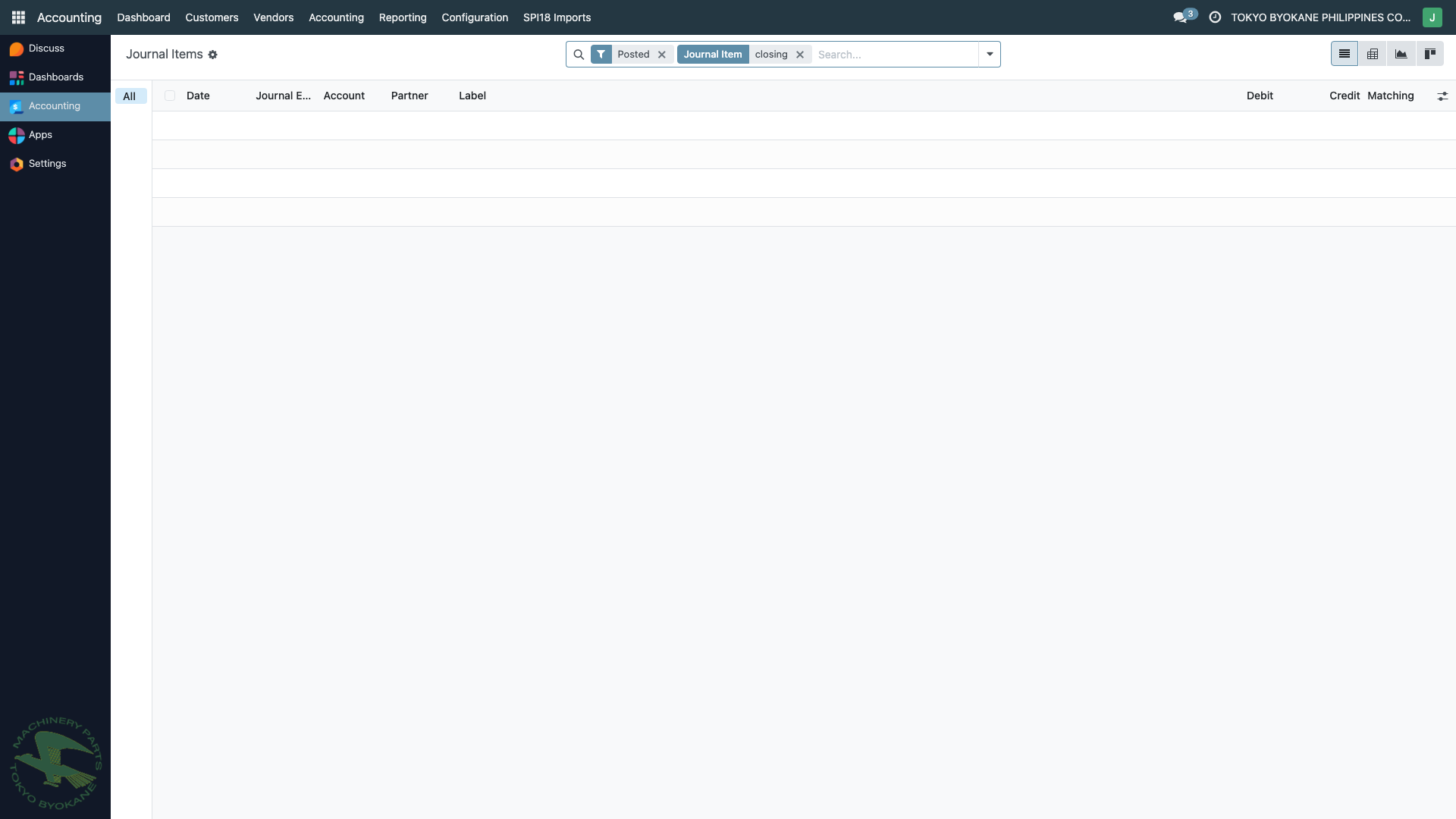
The result list is empty. There is no "closing entry" in our GL — yet the Balance Sheet still shows the right Retained Earnings figure, because Odoo computes it on the fly.
Recommendation
Do not build an automated closing-entry cron. Reasons:
- The end result (correct Retained Earnings, books closed, no backdated changes) is already achieved by Odoo's standard mechanism + the Fiscal Year Lock Date.
- Building the cron introduces a fragile "unpost-recompute-repost" loop that can corrupt the closing entry if anything in the chain fails — especially relevant given TBPC's multi-currency setup (USD books, PHP local — every recompute would touch FX-sensitive lines).
- PowerApps used a closing JE because it could not compute equity on the fly. Odoo can. Copying PowerApps' workaround into Odoo would be moving backward.
Recommended year-end workflow
- Throughout the year, post normal transactions. The Balance Sheet automatically reflects YTD P&L as Undistributed Profits/Losses.
- After year-end, allow late adjustments (auditor JEs, accruals, reclassifications) for as long as the period is reasonably open — typically Jan–Mar.
- Once the prior year is finalized, set the Global Lock Date to Dec 31 of that year. The books are now formally closed.
- From the day the lock is set onward, the Balance Sheet's Retained Earnings figure for that year is fixed — no JE needed.
When You Would Build the Automation
A closing JE may be legitimately required if:
- BIR or external auditors explicitly demand to see a posted closing entry in the GL. Some Philippine auditors expect this as part of the year-end audit trail.
- The parent company in Japan requires it for consolidation. Tokyo Byokane Japan's accounting system may need a balanced closing transaction to reconcile against.
- A regulatory submission requires the books to show explicit "closed" status at the transaction level (rare).
If any of the above applies, a closing wizard can be implemented later — but it should be opt-in, manual-trigger-only, and produce a clearly labeled JE. We would not build an auto-reposting cron in the style of PowerApps.
Open Question
Before locking this in as the recommended approach, please confirm:
Is TBPC's fiscal year January 1 – December 31, or does it follow Tokyo Byokane Japan's fiscal year (typically April 1 – March 31)?
This affects when the Global Lock Date should be set each year. The current Odoo configuration is Jan–Dec (fiscalyear_last_day=31, fiscalyear_last_month=12 on res.company). If TBPC actually follows Japan's FY, the company configuration needs to be changed.
Technical Reference
For developers — relevant files and Odoo internals:
- Balance Sheet OWL component:
common/ph_accounting_reports/static/src/balance_sheet/ - Balance Sheet data model:
common/ph_accounting_reports/models/balance_sheet_report.py - Lock-date wizard (Cybrosys base):
common/base_accounting_kit/wizard/account_lock_date.py - Lock-date wizard (ARE18 inherit — exposes Fiscal Year Lock Date):
are18/wizard/account_lock_date.py - Commit exposing Fiscal Year Lock Date:
59e5913 - Odoo standard field:
res.company.unaffected_earnings_account(M2O toaccount.accountwith typeequity_unaffected)